
You clicked something perfectly ordinary, or pressed save on a post, and the screen came back with 406 not acceptable. It reads like the server is telling you off, and it gives you nothing to work with.
Don’t worry, you are not alone, and there is a twist in this one that saves a lot of wasted time. By the book, a 406 is about the Accept header, which is how your browser says what kind of content it can take. In real life, on shared hosting, a 406 is nearly always the server firewall, usually mod_security, refusing the request for a completely different reason and answering with that code because whoever wrote the rule chose it.
So the causes worth checking, in the order they actually happen, are:
- A firewall rule that did not like something in your content, such as a snippet of code in a post
- A security plugin or a CDN rule blocking the request before it reaches your site
- An API client asking for a format the server does not produce
- A route in your own code that exists but has no response format registered
In this article you will learn what a visitor can do, then the five checks for an owner, and how a 406 differs from 400, 403 and 415, which look similar and mean different things.
So let’s get started.
If the site is not yours
Try the page in another browser, and on your phone with wifi off. If it works somewhere else, something in your browser, an extension or a proxy is changing the request.
If the error appeared while you were sending a form or writing a comment, try again with plain text and no code in it, because a firewall rule may have matched a word or a symbol in what you typed.
If it fails everywhere, the site has a rule that refuses you and only the owner can change it. Changing browser will not help in that case, so contacting them is all that is left.
Where it actually breaks
Every page you open makes the same journey. Knowing which step this error stops at tells you which half of the list below is worth your time, because the green steps are already proven to be working.
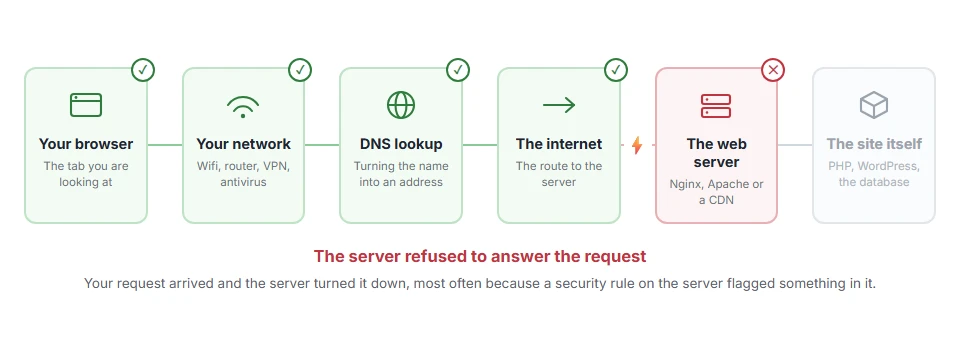
1) Look at the Accept header on the request
Open your browser’s developer tools with F12, go to Network, reload the page and click the failing request. Look at the request headers for Accept.
If your own code or app is the one calling, print the headers it sends. An API client asking for application/xml when the server only produces JSON gets a 406 and is right to. Fix it by asking for what the server actually produces, usually application/json, or by sending Accept with a star.
An ordinary browser almost never causes this, because it sends a permissive header. So if a normal page in a normal browser fails, this is not your cause and step 2 is where the answer is.
2) Test whether mod_security is doing it
This is the fix for most WordPress and cPanel sites, and it takes two minutes.
In cPanel, find the ModSecurity tool and turn it off for the domain. Reload the failing page. If it works, you have your answer, so turn it straight back on before you do anything else.
Now ask your host, or read the ModSecurity log yourself, for the rule id that fired at that moment. With that id they can disable one rule for one site instead of leaving your whole site unprotected.
Never leave it off. It blocks real attacks every day, and disabling one rule is the safe version of this fix.
3) Work out which request triggers it
The pattern tells you a lot, so note exactly when it happens.
A 406 while saving a post or a page usually means the firewall did not like something in your content, often a snippet of code, a script tag, or a word in a URL. A 406 on one product page is often the same thing sitting in a description.
Try saving the same content with the suspect part removed. When it saves, you have found what the rule matched.
This is a firewall being blunt rather than a sign your content is wrong. The answer is to have that rule tuned, not to rewrite everything you publish.
4) Check your own plugins, rules and CDN
If mod_security is not the cause, something in your own stack is refusing.
Look in .htaccess for rules added by a security plugin, and check any SetEnvIf or RewriteCond lines that examine headers or user agents. Turn security plugins off one at a time and test. Then look at Cloudflare or whatever sits in front of your site, because a custom rule there can return any code the author picked.
Before you edit .htaccess, keep a copy of the old one. A wrong line in that file takes the whole site down rather than one page.
5) For an API, agree on one content type
If you own both sides, this is a five minute conversation with yourself.
Have the client send Accept with application/json, and the server declare Content-Type as application/json. Then test with curl so you can see the raw exchange without a browser in the way.
Some frameworks answer 406 when a route exists but its response format is not registered, so check the route definition as well as the headers. Changing the client alone does not work in that case.
How a 406 differs from 400, 403 and 415
Four codes, four different refusals, and knowing which is which saves you looking in the wrong place.
A 400 bad request means the request was malformed, and our page on 400 bad request covers it. A 403 forbidden means you are not allowed at all, which is on the 403 forbidden page. A 415 unsupported media type is the mirror image: the server cannot read what you sent. A 406 not acceptable means the server could answer, but not in a way you said you would take. If it refused the method rather than the format, that is 405 method not allowed.
FAQ(406 Not Acceptable)
Is a 406 error dangerous?
No. The page was refused, not damaged, and nothing was lost. It is a rule saying no.
Why does my page work for some visitors and not others?
Their browser or their network is sending a different request. Extensions, corporate proxies and older apps all change headers.
Why do I only get it when saving a post?
Because saving sends your content to the server, and a rule matched something in it. That is the classic mod_security case in step 2.
Can I just disable the firewall to fix this?
You can, and it is a bad trade. Disable it for the two minutes it takes to test, then have one rule tuned instead.
Does 406 affect my search rankings?
Only if crawlers get it. Search engines send a permissive Accept header, so a page that returns 406 to a crawler has a rule aimed at more than the header.
If you have any issues, you can ask me via comment, and I will love to help you out.
