
Are you being thrown out of Minecraft with a grey screen that says internal exception java.net.socketexception connection reset, usually right in the middle of something?
Don’t worry, you are not alone, this is one of the most common multiplayer errors there is. What it means is that the connection between you and the server closed suddenly, without either side saying goodbye properly. Nobody kicked you and nothing is broken on your account.
The causes, in the order they actually turn up, are:
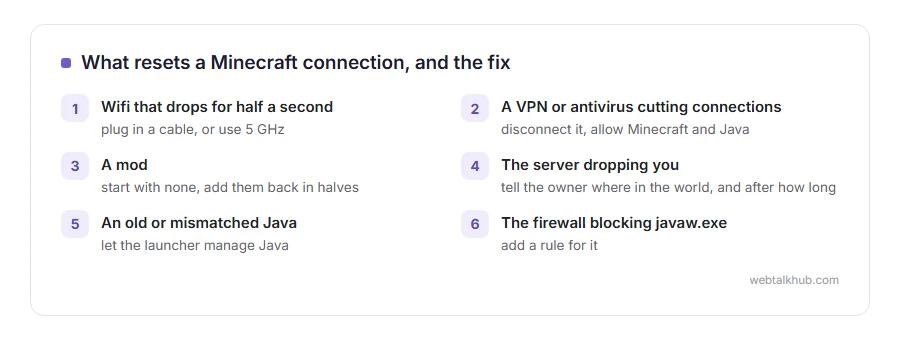
- Your wifi dropped for half a second, which is enough to kill a game connection
- A VPN or an antivirus is cutting long connections
- A mod, usually one that changes chunk loading or networking
- The server is limiting or dropping you, which you cannot see from your side
- Java is old, or the launcher is using a different Java than you think
- The firewall is blocking javaw.exe after an update moved it
In this article you will learn how to tell in two minutes whether it is you or the server, then eight fixes in the order that solves it most often. There is also a short part for developers, because the same error turns up in server logs with nothing to do with Minecraft.
So let’s get started.
First, two tests that split the problem in half
Try a different server. If other servers hold and one keeps dropping you, the problem is that server or the route to it rather than your computer.
Then try a different network, for example your phone’s hotspot, for one join. If it holds on the hotspot and drops on your wifi, your own connection is in it.
Write down which of those happened, because it decides which half of this list is worth your time.
1) Restart in the right order
Close Minecraft completely, restart your router, and wait two full minutes before starting the game again.
A router that has been up for weeks can hold a broken connection table, and the restart clears it along with any stale address.
This will not help when the server is the one dropping you. If other players on that server are fine at the same moment, go straight to fix 5.
2) Turn off the VPN, and check the antivirus
A VPN adds another leg to the journey and each leg can drop, and free VPNs are the worst for it because they cut long lived connections to keep their servers free.
Disconnect any VPN and try again. Then look in your antivirus for web shield, network protection or firewall, and allow both Minecraft and Java through it, or switch it off for one test.
If you have to use a VPN for the server you play on, I recommend picking one with a server in the same country as the game server, because every extra hop is another chance to drop.
3) Be honest about your wifi
Minecraft holds one connection open the whole time you play, so it notices a wobble that a web page would never show.
Plug in a cable if you possibly can. If you cannot, move closer to the router and use the 5 GHz network rather than the 2.4 GHz one.
A speed test proves less than people think here. Speed is not the problem, a half second gap is, and a cable rules your wifi out completely.
4) Take the mods out
On a modded setup this is the most common single cause.
Start the game with no mods at all and join the same server. If it holds, add them back in halves until it breaks again, which finds the culprit in a few rounds instead of one at a time.
Mods that change chunk loading, view distance or networking are the usual ones, and a mod built for a different Minecraft version can do this even when the game starts perfectly.
If the server requires certain mods, this test has to be done on a server that does not, or with the owner’s help.
5) Tell the server owner what to check
When only one server drops you, there are things they can look at and you cannot. Their packet rate limit can kick players who send too many packets. Their view distance and entity settings matter most when a lot is happening at once. And their own hosting counts too, because a server on a busy shared box drops players under load.
Give them two useful details: whether it happens at a particular place in the world, and whether it happens after a set amount of time. Both point at different causes.
On a big public server, one player getting this while hundreds do not is usually the route between you and them rather than their settings, and nothing they change will fix that.
6) Update Java, and check which Java is being used
An old or mismatched Java is a real cause and it is easy to miss, because the game still starts.
In the launcher, open the installation settings and look at the Java path. If you are not sure, let the launcher manage Java for you, since it installs the right version.
This matters most on older launchers and on modded setups. On the current launcher with no mods, Java is rarely the cause, so do not spend an evening on it.
7) Give the firewall a proper rule
Windows Defender Firewall can block Java after an update, because the old rule points at the previous Java folder.
Switch the firewall off for a single join. If that fixes it, turn it straight back on and add a rule for javaw.exe instead.
Never leave a firewall off. If this is the cause, the fix is the rule, not the switch.
8) Try a different DNS
This one helps less often, and it costs nothing.
Set your network to use 1.1.1.1 or 8.8.8.8 instead of your provider’s DNS, then join again. It can change the route you take to the server.
It only works if the server address is the problem rather than the connection itself. If the direct IP address works and the name does not, that is exactly the case where it helps.
The same error outside Minecraft
If you are a developer and you see connection reset in a log, it means the same thing: the other end closed the connection without the usual goodbye.
The usual causes there are a server that timed the connection out, a proxy or load balancer with a shorter timeout than your client, a client that hung up early, and a firewall silently dropping long connections. Find which hop closed first by reading the server log at the same second, and our page on ERR_CONNECTION_RESET covers the browser version of it.
FAQ(Minecraft Connection Reset)
Does this error mean I am banned?
No. A ban gives you a message saying so. This is the connection dying, not the server refusing you.
Why does it happen after exactly the same amount of time?
That points at a timeout somewhere, in a router, a proxy or the server, rather than at a wobbly connection.
Is it my internet speed?
Almost never. Minecraft needs a steady connection, not a fast one, and a short gap is enough while a speed test looks perfect.
Can too many mods really cause it?
Yes, especially any that change how much of the world is loaded. On a modded setup it is the first thing to test.
Will reinstalling Minecraft fix it?
Rarely, because the problem is usually between you and the server rather than in the files. The network tests cost far less time.
If you have any issues, you can ask me via comment, and I will love to help you out.
