
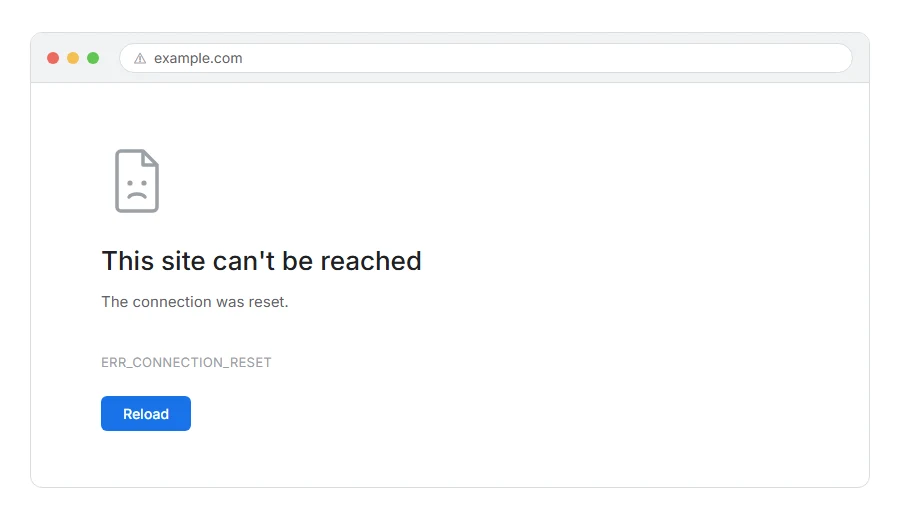
The page half loads, or does not load at all, and Chrome tells you the connection was reset with ERR_CONNECTION_RESET underneath.
Here is what it means in one line. Your computer and the website started talking, and then something cut the line partway through.
Think of it like a phone call that goes dead mid sentence. It is not that the number was wrong or that nobody picked up. Somebody did pick up, and then the call dropped.
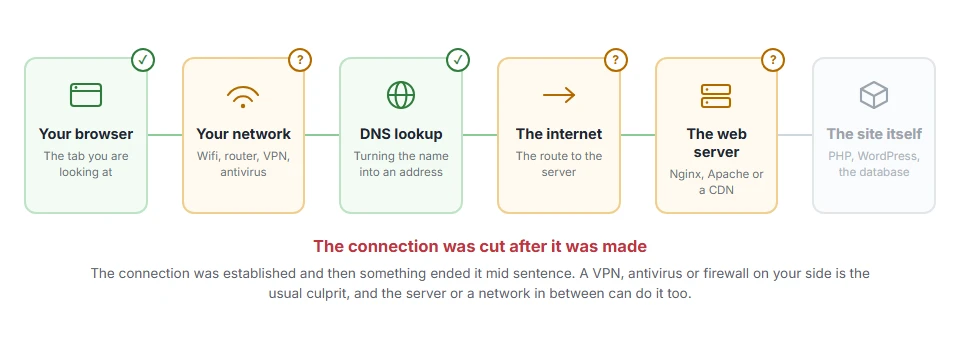
That is a useful thing to know, because it rules a lot out straight away. The site exists, its address resolved fine, and something answered. The break happened after all of that.
Do not worry, you are not alone. This one is nearly always something in the middle rather than the site itself, and I am here to help. The first three fixes take a few minutes between them.
Where it actually breaks
Every page you open makes the same journey. Knowing which step this error stops at tells you which half of the list below is worth your time, because the green steps are already proven to be working.
Step 1: Try the site in a private window
Always first, because it separates “your browser” from “everything else” in ten seconds.
If the page loads in a private window, an extension or a cached copy in your normal browser was the cause. Ad blockers and privacy extensions are the usual pair.
When this will not help: if the private window resets too, extensions are not your problem. Carry on.
Step 2: Turn off your VPN or proxy
A VPN adds an extra hop, and if that hop drops the connection you get exactly this.
Turn it off and reload. If the site comes up, you have your answer, and the fix is a different server in your VPN app or a different provider.
When this will not help: if you are on a company network you may be behind a proxy you cannot switch off. In that case skip to step 7 and talk to whoever runs it.
Step 3: Restart your router
Boring, and right more often than it deserves to be.
Unplug it at the wall, wait thirty seconds, plug it back in and let it settle for a minute before trying again. A router that has been up for months quietly builds up broken connection state.
When this will not help: if you are on mobile data there is no router in the picture.
Step 4: Flush your DNS and reset the network stack
If it is still happening, reset the network plumbing on your own machine.
On Windows, open Command Prompt as administrator and run these in order:
ipconfig /flushdns
netsh winsock reset
netsh int ip reset
Then restart the computer. That last part matters, the reset commands do not fully take effect until you do.
On macOS, open Terminal and run:
sudo dscacheutil -flushcache; sudo killall -HUP mDNSResponderWhen this will not help: netsh winsock reset clears settings some VPN and antivirus programs rely on. If your VPN stops working afterwards, reinstall it and it will be fine.
Step 5: Turn off your antivirus or firewall for two minutes
Security software inspects encrypted traffic by sitting in the middle of it, and when it gets that wrong the connection is reset.
Turn it off, load the page, turn it straight back on. Do not browse around with it off.
If the page worked while it was off, do not leave it off. Add the site to your antivirus’s exception list instead.
When this will not help: Windows Defender rarely causes this. Third party suites with a “web shield” or “HTTPS scanning” feature are the ones to suspect.
Step 6: Try a different network
This is the test that tells you whether the problem is your connection or the site.
Turn wifi off on your phone and load the page over mobile data. If it works there, the problem is your home or office connection. If it resets there too, the problem is the site or your internet provider’s route to it.
When this will not help: this only tells you where the problem is, not how to fix it. But knowing which side to work on is worth two minutes.
Step 7: If it only happens on one site, tell them
A reset on a single site while everything else is fine usually means their server is dropping connections.
That can be an overloaded server, a firewall rule that dislikes your address, or a TLS setting that your browser and their server cannot agree on.
There is genuinely nothing you can do from the outside. Contact them, tell them you are getting ERR_CONNECTION_RESET, say roughly when, and mention that other sites work fine.
When this will not help: if the site is yours, the next section is for you.
If it is your own site giving this error
Then the reset is coming from your side and there are three usual causes.
Your server is dropping connections under load. Check whether it happens at busy times. If so, look at your PHP worker limit and your traffic together.
A firewall rule is closing connections from certain addresses. Look in your host’s firewall log for your visitor’s address at the time they reported it.
A TLS mismatch. If only older devices get the reset, your server is probably refusing old TLS versions, which is generally correct behaviour rather than a fault. Run an SSL checker against your domain and see which versions you accept.
Why “reset” is different from “refused” or “timed out”
Worth one paragraph, because the three get muddled and they point at different things.
Reset means the conversation started and was cut off. Something in the middle, or the far end, hung up.
Refused means the far end answered and said no. Usually nothing is listening on that port.
Timed out means nobody answered at all and your browser gave up waiting.
If you know which of the three you are looking at, you have already halved the list of things to check.
Frequently asked questions
Is ERR_CONNECTION_RESET a virus? No. It is a network event. Malware can cause one by interfering with traffic, but that is far down the list of likely causes.
Why does it happen on only one website? Because the problem is between you and that one server. A firewall rule, a route, or their server dropping connections. Step 6 confirms it quickly.
It works on my phone but not my laptop. Why? Different network, different software. That points at your laptop’s antivirus, VPN or extensions, so steps 1, 2 and 5 are where to look.
Will resetting winsock break anything? It resets network settings to defaults, which some VPN and antivirus tools depend on. Nothing is lost permanently, but you may need to reinstall those tools afterwards.
If you have any issues, you can ask me via comment, and I will love to help you out.
If the wording is slightly different
Error names are easy to mix up, and the wrong page wastes your time. If what you are looking at is not quite what this one describes, one of these will be closer.
- ERR_CONNECTION_CLOSED, the connection ended without an answer rather than being cut mid stream.
- ERR_NETWORK_CHANGED, your own connection changed while the page was loading, which is usually harmless.
- ERR_TUNNEL_CONNECTION_FAILED, a proxy is in the way, often one you did not know was set.
The Minecraft version of this error
Minecraft players meet the same thing worded differently: internal exception java.net.socketexception connection reset, usually mid game. The meaning is identical, the connection was closed without warning, and that page works through the causes that belong to a game server, including mods, VPNs and the connection limits a server sets.
