
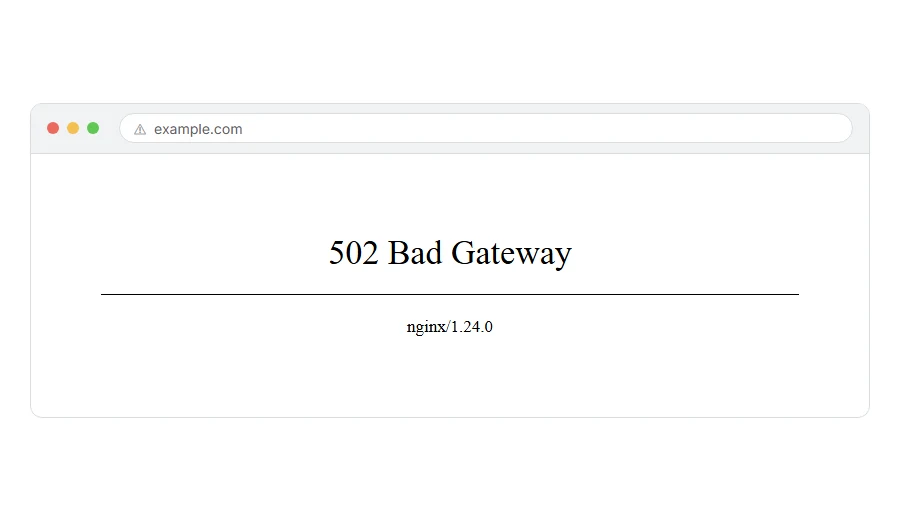
You clicked a link and got a mostly blank page saying 502 bad gateway. No explanation, no button, nothing to click. It is one of the most annoying errors on the web because it tells you almost nothing.
Here is what it actually means, in one line. A server in the middle asked another server for the page, and got back something it could not understand. Think of it like a waiter carrying your order to the kitchen. The waiter is fine. The kitchen handed back something that is not food.
So it is almost always a server problem, not a you problem. Usually nothing on your computer caused it and your browser is fine.
Do not worry, you are not alone. This one hits everybody, and I am here to help. What you should do next depends on whether the site is yours or somebody else’s, so I have split it that way.
Is it your site, or somebody else’s?
If you are just trying to read a page and it is not your website, skip to the visitor section. It is short, because honestly there is not much you can do.
If it is your own site, go to the owner section. That is where the real fixes are.
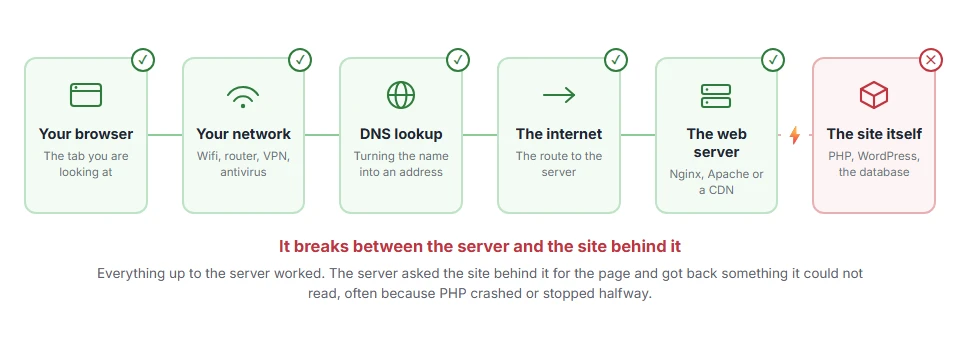
Where it actually breaks
Every page you open makes the same journey. Knowing which step this error stops at tells you which half of the list below is worth your time, because the green steps are already proven to be working.
If you are just a visitor
There are only three things worth trying, and none of them takes long.
Reload the page. Wait about thirty seconds and press Ctrl and F5, or Cmd and Shift and R on a Mac. Plenty of 502s last less than a minute, because the server is restarting or briefly overloaded.
Try it on your phone with wifi turned off. If the page loads there but not on your computer, something local is in the way, usually a VPN, a work network or a stale copy in your browser.
Wait and come back. If it is still there in an hour, the site owner has to fix it. There is genuinely nothing on your side left to do.
When this will not help: if the error shows on every site you visit, it is not a 502 from one server, it is your connection or your proxy. Restart your router and try again.
If it is your site
Now we can actually get somewhere. Work down this list in order, because it goes from most likely to least.
Step 1: Check whether your host is having a bad day
Before you touch anything, look at your hosting company’s status page and their social account. A 502 across every site on a shared server is very common and it is not yours to fix.
This takes one minute and it can save you an afternoon of pulling plugins apart for nothing.
When this will not help: if other sites on the same host are fine, the problem is yours. Carry on to step 2.
Step 2: Turn off your CDN or proxy for a moment
If you use Cloudflare or a similar service, it sits between the visitor and your server, which makes it the classic middle man in a 502.
In Cloudflare, switch the orange cloud next to your record to grey, which pauses the proxy and sends traffic straight to your server. Give it a couple of minutes, then try the page again.
If the site comes back, the problem is between Cloudflare and your server rather than in your site. If it stays broken, your server itself is unhappy, so turn the cloud back on and move to step 3.
When this will not help: if you do not use a CDN at all, skip this. Plenty of sites do not.
Step 3: Look at the PHP error log
This is the step people skip and it is usually the one that tells you the answer.
Your host will have an error log somewhere in the control panel, often under Metrics, Logs or Errors. Open it and look at the last few lines around the time the 502 started. A fatal error, a memory message or a timeout will be sitting there in plain text.
If you see a plugin or theme name in that line, you have found your culprit without guessing.
When this will not help: some budget hosts do not expose the PHP log at all. If you cannot find one, ask support to send you the last hundred lines. They can see it even when you cannot.
Step 4: Deactivate plugins, one at a time
If the log pointed at a plugin, start with that one. If you have no log, do it the blunt way.
If you can still reach your dashboard, deactivate everything, check the page, then switch them back on one by one, testing each time. If you cannot reach the dashboard, use FTP or your host’s file manager to rename the folder wp-content/plugins to plugins-off. That turns them all off at once and gets you back in.
Rename it back afterwards and your plugins return, deactivated, with their settings intact.
When this will not help: if the 502 happens with every plugin off and a default theme active, it is not your site’s code. Go to step 5.
Step 5: Ask your host to check the PHP workers and the timeout
At this point it is almost certainly a resource limit rather than a bug.
Send your host a message and be specific, because it saves days of back and forth. Tell them you are getting a 502, that you have already ruled out the CDN, plugins and theme, and ask them to check your PHP-FPM workers, the memory limit and the gateway timeout for your account.
Said like that, most support teams will look in the right place first time.
When this will not help: nothing here helps if your site is simply on a plan too small for its traffic. If the 502 appears every day at your busiest hour, that is not a bug, that is a plan that has been outgrown.
Why a 502 happens at all
It is worth knowing, because it explains why the fixes are what they are.
Most websites are not one machine. There is usually something at the front taking requests, such as Nginx or a CDN, and something behind it that actually builds the page, such as PHP. The front one is the waiter. The back one is the kitchen.
A 502 bad gateway is the waiter coming back and saying the kitchen handed over something that is not food. Maybe PHP crashed halfway. Maybe it sent back half a page and then went quiet. Maybe the kitchen is not there at all.
That is also why a 502 is different from a 404 or a 500. A 404 means the page does not exist. A 500 means the page tried to build and failed. A 502 means the two halves of your site stopped talking properly.
Frequently asked questions
Is a 502 bad gateway my fault as a visitor? Almost never. Usually nothing you did caused it and nothing on your computer can fix it. The exception is a VPN or a proxy on your side, which can return a 502 of its own. Otherwise, reloading is worth a try because many are brief, but that is the extent of your control.
How long does a 502 usually last? There is no fixed answer, and anybody giving you one is guessing. Some clear in seconds because a service restarted. Some last hours because a host is having a real outage.
Is it dangerous? Has my site been hacked? Almost never. It is far more often a crashed PHP process, a timeout or a host problem. A hack can cause one, but it is well down the list of likely causes.
What is the difference between 502 and 504? They are cousins. A 502 means the answer came back broken. A 504 means no answer came back at all before the clock ran out. The things you check are much the same.
Does refreshing make it worse? No, though hammering refresh on an already overloaded server does not help it recover either. Wait half a minute between tries.
If you have any issues, you can ask me via comment, and I will love to help you out.
The neighbouring server errors
Error names are easy to mix up, and the wrong page wastes your time. If what you are looking at is not quite what this one describes, one of these will be closer.
- 404 Not Found, the server is fine and the page itself is not there.
- 400 Bad Request, the server could not understand the request, usually oversized cookies.
- ERR_EMPTY_RESPONSE, the server accepted the request and then sent nothing back at all.
The error that looks like this one
A 502 means an answer came back and it was broken. If your page instead hung for a long time and then failed with nothing at all, you are looking at a 504 gateway timeout, which is the same family with a different cause. The checks overlap, and knowing which one you have saves you reading the wrong log.
The neighbouring numbers
A 502 sits in a family, and the family is worth five minutes once.
- the HTTP status codes list, what each one means and which of them you will actually meet.
