
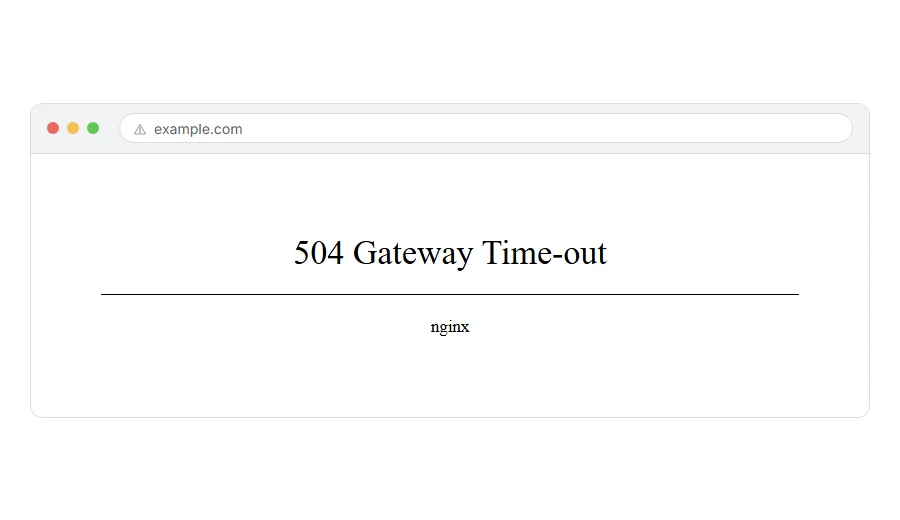
If you are staring at a nearly empty page that says 504 gateway timeout, you are probably wondering whether your internet is broken, whether the website is gone for good, or whether you have done something wrong.
You have not, and don’t worry, you are not alone. This is one of the most common errors on the web and it means something quite specific: one server asked another server for the page, waited, and gave up before an answer came back. Nobody refused you. Nothing answered at all.
The usual causes are:
- The website’s host is having a bad hour, or a whole server is overloaded
- A service in front of the site, such as Cloudflare, cannot get an answer out of it
- Something on the site is slow, often a plugin, a big database query or a call to another company’s service
- The site has run out of the workers that serve pages, so requests queue until the clock runs out
- Your own network is in the way, which is rare but easy to rule out
In this article you will learn how to tell in one minute whether this is yours to fix, three things worth trying as a visitor, and five checks for a site owner in the order that finds the cause fastest. You will also see why a 504 is not the same as a 502 or a 503, which trips people up constantly.
So let’s get started.
The one minute test that tells you whose problem it is
Open the same page on your phone with wifi switched off, so it goes over mobile data.
If the page loads there, the site is fine and something between your computer and it is the trouble. If it fails there too, the site itself is the problem and nothing you do at home will change it.
That test is worth doing first every time, because the two halves of this page have nothing to do with each other.
If you are just a visitor
There are three things worth trying, and I will not pretend there is a fourth.
Wait about thirty seconds and reload with Ctrl and F5, or Cmd and R on a Mac. A lot of timeouts last less than a minute, because something restarted or was briefly overloaded.
Turn off any VPN and try again. A VPN adds another leg to the journey and any leg can time out.
Then come back in an hour. If the page is still timing out, only the site owner can fix it, and refreshing every two minutes will not speed that up.
If every site you open times out, this is not a 504 from one server at all. Restart your router, and if you are on a work or hotel network, try your phone’s hotspot to see whether the network is the problem.
If the site is yours
Now it gets useful. Work down these in order, because it runs from the most likely cause to the least.
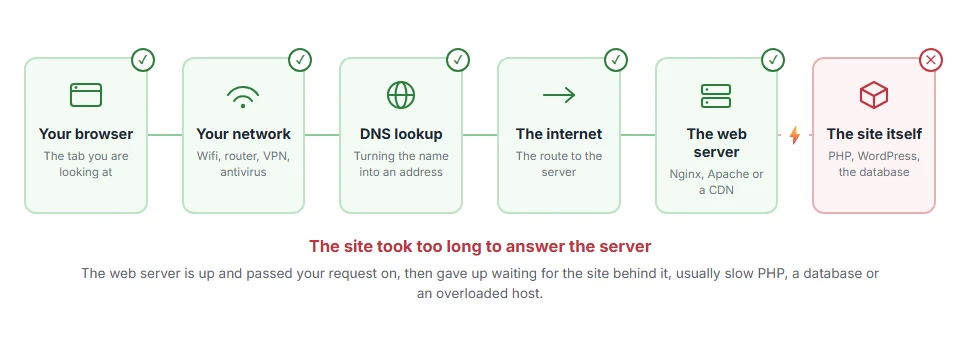
Where it actually breaks
Every page you open makes the same journey. Knowing which step this error stops at tells you which half of the list below is worth your time, because the green steps are already proven to be working.
1) Check whether your host is having a bad day
Before you touch a setting, open your hosting company’s status page and their social account.
A 504 across lots of sites on the same server is a host problem, and there is nothing in your site to fix. This takes a minute and it can save you an afternoon of pulling plugins apart for nothing. If other sites on the same host are loading fine, the problem is yours and you can move on.
2) Take your CDN or proxy out of the picture for a moment
If you use Cloudflare or anything similar, it sits between your visitor and your server, which makes it the middle man in a timeout.
In Cloudflare, set the orange cloud next to your record to grey for a few minutes so traffic goes straight to your server. If the page comes back, the trouble is between the proxy and your server. If it stays broken, your own server is unhappy and you can turn the cloud back on.
One detail worth knowing: Cloudflare has its own timeout page, error 524, which means the request did reach your server and your server never finished. A plain 504 usually points further up the chain. If you do not use a CDN at all, skip this step, plenty of sites do not have one.
3) Read the error log before you guess
This is the step people skip and it is usually the one that names the cause.
In your hosting panel, look under Logs, Metrics or Errors and open the PHP error log. Read the last lines from around the time the timeouts started. A slow database query, a fatal error, or a call to another service that never returned will be sitting there in plain words, often with a plugin or theme name next to it.
Some budget hosts do not expose the log at all. If you cannot find one, ask support for the last hundred lines, because they can see what you cannot.
4) Find the slow thing, which is usually a plugin or an outside service
A 504 is a slow thing rather than a broken thing. Something took longer than the server was willing to wait.
The usual culprits are a backup or import running in the background, a security plugin scanning every file, a broken cron job repeating itself, and your site calling an outside service that has gone quiet. That last one is the sneaky one, because your server is perfectly healthy and simply sitting there waiting for somebody else.
Deactivate plugins in groups rather than one at a time, testing the page after each group, and start with anything that talks to another company. If the timeout still happens with every plugin off and a default theme active, it is not your site’s code and step 5 is where the answer is.
5) Ask your host about workers and timeouts
At this point it is a hosting conversation, and there are three things to ask for by name: how many PHP workers your plan has, what the PHP maximum execution time is, and what the proxy or FastCGI read timeout is set to.
On shared hosting a burst of traffic, or one slow page, can use every worker, and everyone else then queues until the front end gives up. Raising the timeout only hides that. Raising the worker count, or making the slow page faster, actually fixes it.
Raising a timeout is not always wrong, it just is not a cure. Use it to buy yourself time while you hunt down the slow query or the slow API call.
Why a 504 is not a 502 or a 503
These three get mixed up all the time, so here they are together.
A 502 bad gateway means an answer did come back and it was broken. Our page on 502 bad gateway walks through that one. A 503 service unavailable means the server is up and deliberately refusing for now, usually maintenance or overload, and that is covered on our 503 service unavailable page. A 504 gateway timeout means no answer came back at all before the clock ran out. Nobody said no. Nobody said anything.
FAQ(504 Gateway Timeout)
Is a 504 gateway timeout my fault as a visitor?
Almost never. Your browser did its part. Reloading is worth one try because many timeouts are brief.
How long does a 504 last?
There is no set time. Some clear in seconds when a service restarts, others last hours during a real outage. Anybody quoting you a number is guessing.
Does a 504 hurt my search rankings?
A short one, no. Days of timeouts on a crawled page will cost you eventually, because search engines stop retrying a page that never answers.
Can a plugin really cause a timeout?
Yes, and on WordPress it is the most common cause I see. Anything that scans files, calls another service or runs a big job on every page load can do it.
Is 504 the same as error 524 on Cloudflare?
No, and the difference is useful. 524 means your server received the request and never finished it, which points straight at your own code or database.
If you have any issues, you can ask me via comment, and I will love to help you out.
The timeout that runs the other way
A 504 means your server waited on another server. If instead the server gave up waiting for the request to arrive from the visitor, usually during a slow upload, that is a 408 request timeout, and the settings behind it are completely different.
