
Did a page come back with 408 request timeout after you submitted a form or uploaded something, leaving you unsure whether anything was saved?
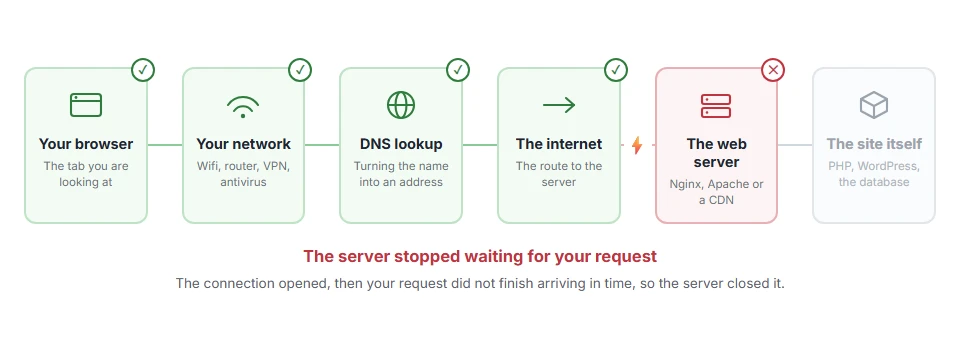
Don’t worry, this one is rarer than the errors around it and it has a precise meaning. The server was waiting for your request to arrive in full, waited longer than it is willing to, and closed the connection. Notice the direction: it is not your page taking too long to load, it is your request taking too long to arrive.
That direction explains the usual causes:
- A slow or dropping connection while a large file was being uploaded
- A form left open for a long time before being submitted
- A proxy, VPN or mobile connection pausing halfway through
- A server with a short timeout, which is often the real reason on shared hosting
- A bot or a scanner holding connections open, which some servers answer with 408
In this article you will learn what to try as a visitor, the four settings a site owner should look at, and how a 408 differs from a 504 and a 524, which are also about time running out and mean different things.
So let’s get started.
If you are just a visitor
Try the same action again, and watch what happens the second time.
If it goes through, the first attempt was a hiccup in the connection and there is nothing to fix. If it fails again at roughly the same point, especially on an upload, your connection is dropping or pausing for longer than the server will wait.
Three things are worth trying in that case. Switch from wifi to mobile data, or the other way round. Make the file smaller with something like our PDF compressor. And for a long form, write it in a text editor and paste it in, so the page is not sitting open for twenty minutes before you submit.
Reloading the error page itself will not help, and on a form it can send everything twice. Go back and start the action again instead.
Where it actually breaks
Every page you open makes the same journey. Knowing which step this error stops at tells you which half of the list below is worth your time, because the green steps are already proven to be working.
1) Check your own timeouts first, if the site is yours
The setting that produces a 408 is usually one you can see.
On Apache, look at the Timeout directive and at mod_reqtimeout, which sets how long a request has to arrive. On Nginx, look at client_body_timeout and client_header_timeout. The defaults, often 60 seconds or less, time each pause in sending rather than the whole upload, so they cut off an upload that stalls, not a slow one that keeps going.
Before you change anything, take a copy of the configuration file, because a wrong line here takes the whole site down rather than one page. Raise the values for the paths that accept uploads rather than across the whole server, and remember a longer timeout also means a slow client can hold a worker open for longer.
2) Look at what is in front of your server
A load balancer, a CDN or a reverse proxy has its own timeout, and the shortest one in the chain wins.
If you use Cloudflare, that is where their own 524 comes from rather than a 408. Check any nginx proxy you run yourself, and any host level proxy your provider puts in front of you.
Changing the setting on your own server does not work when something in front of you is doing the timing, which is why this step comes second rather than last.
3) Check whether it is bots rather than people
Some servers answer idle or half open connections with a 408, and a scanner can generate hundreds of them a day.
Read the access log for the requests that got a 408 and look at the addresses and the user agents. If they are all the same address range, or all obviously automated, this is noise rather than a problem for your visitors.
Before you spend a day on it, check whether any real page is affected at all. Plenty of 408 lines in a log are healthy servers doing exactly what they should.
4) Make the upload path kinder
If your visitors hit this while uploading, the fix is usually on the page rather than in the server.
Split large uploads into chunks, show progress so people do not give up, and set the limit you accept honestly on the form. Our page on 413 request entity too large covers the size limits that produce the other error people meet here.
408, 504 and 524 are three different clocks
They all mean time ran out and they mean it about different things.
408 means your request never arrived in full, so the server gave up waiting for you. 504 gateway timeout means the server waited on another server and got nothing, which our 504 gateway timeout page covers. 524 is Cloudflare’s own: it reached your server and your server never finished the answer.
Knowing which one you have tells you which direction to look in, and that is most of the work.
FAQ(408 Request Timeout)
Did my form submission go through?
Usually not, because the server never received the whole request. Check the site rather than assuming, then send it again.
Is a 408 my fault or the site’s?
It is about the connection between you, so both sides can cause it. An upload that stalls on a weak connection is the most common reason.
Why does it only happen on big files?
Because a large upload takes longer, which gives a weak connection more time to stall, and a stall longer than the server’s timeout ends it.
Can a VPN cause a 408?
Yes. A VPN adds another leg to the journey, and a pause on any leg can be enough.
Does refreshing help?
No, and on a form it can submit twice. Go back and start the action again.
If you have any issues, you can ask me via comment, and I will love to help you out.
