
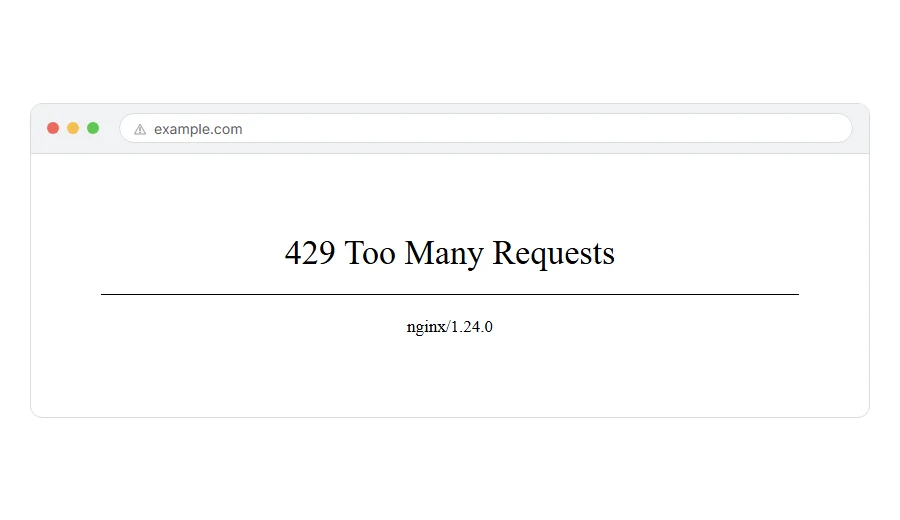
You are seeing 429 Too Many Requests, sometimes with a note about rate limiting, sometimes with nothing else at all.
In one line: a server has decided you are asking for things faster than it wants to answer, so it has told you to wait.
Think of it like a queue at a counter where somebody keeps pushing back to the front. Eventually the person serving says “wait your turn”. Nothing is broken and nobody is banned. You have just been asked to slow down.
Do not worry, you are not alone. A 429 is designed to be temporary, and I am here to help whether you are the one being slowed down or the one whose site is doing the slowing.
If you are a visitor being blocked
Step 1: Wait, and do not refresh
This is genuinely the correct first move, and hammering refresh makes it last longer because each refresh counts as another request.
Most rate limits reset after a minute, five minutes or an hour. Look for a message on the page telling you which, because some servers say so.
When this will not help: if the limit is tied to your address rather than a time window, waiting alone will not clear it. Step 3 covers that.
Step 2: Check whether something on your machine is making requests for you
You may not be the one being noisy.
Browser extensions that prefetch links, a price tracker, a download manager, or a tab you left open that polls a page every few seconds can all trip a limit without you noticing.
Close the other tabs for that site, and try in a private window with extensions off.
When this will not help: if you only had one tab open and no extensions, something else is generating traffic from your network. Step 3.
Step 3: Consider that your whole network is being counted as one
On an office wifi, a university network or behind carrier grade NAT on mobile, many people share one address as far as the server is concerned.
If a colleague or another user on the same network is hitting that site hard, the limit lands on all of you.
Test it by turning wifi off and using mobile data, which usually gives you a different address. If it works, that is your answer, and there is nothing to fix on your side.
When this will not help: it tells you why, but not how to fix it. If it is your workplace, whoever runs the network is the person to talk to.
Step 4: If it is an API you are calling, read the headers
For developers rather than ordinary visitors.
A well behaved server sends a Retry-After header telling you how long to wait, and often X-RateLimit-Remaining and X-RateLimit-Reset as well. Read them and back off accordingly rather than retrying in a loop.
When this will not help: not every server sends those headers. If none are present, back off exponentially: wait a second, then two, then four, and stop after a few attempts.
Where it actually breaks
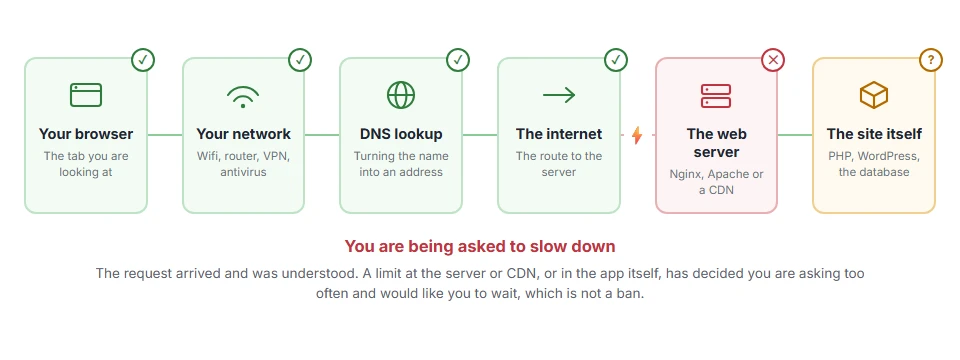
Every page you open makes the same journey. Knowing which step this error stops at tells you which half of the list below is worth your time, because the green steps are already proven to be working.
If it is your own site giving 429 to people
Now the question is which layer is doing it, because on a WordPress site there are usually three candidates.
Your security plugin
Wordfence, Limit Login Attempts, Kadence Security (once called iThemes) and the rest all rate limit by design. A visitor loading pages quickly, or a legitimate crawler, can trip the threshold. But when these big ones block someone, they show a 503, a 403 or a login error, not a 429. If the error really says 429, it more likely comes from another plugin, your CDN or your host.
Look in the plugin’s live traffic or blocked list. It will name the address and the rule. If your own address is there, that is why you cannot get into your own dashboard.
Your CDN or firewall
Cloudflare’s rate limiting rules return a 429 before the request ever reaches your server.
Check the Security Events log. It tells you plainly which rule fired and on which path. This is the fastest way to know whether the block is at the edge or on your server.
Your host
Many shared hosts rate limit at account level and never mention it. If nothing in your plugins or CDN explains it, this is where to ask.
Message support with the exact time and path and ask them whether any rate limit was applied to your account.
When this will not help: none of these help if you are genuinely being attacked. A flood of requests from many addresses is a different problem, and the 429 is your protection working rather than failing.
Do not just raise the limit
Worth saying, because it is the first instinct and it is often wrong.
If a real person triggered your rate limit by browsing normally, the limit is too tight and raising it is correct.
If a bot triggered it, raising the limit lets the bot in. The right move there is to block by pattern rather than loosen for everybody.
So find out which happened before you change the number. The logs will tell you.
Why 429 exists at all
It is one of the more polite errors on the web, and the intent is worth knowing.
A server has a choice when it is overwhelmed: fall over, ignore people, or ask them to slow down. The 429 is the third option, and it usually comes with a hint about when to come back.
That is why waiting genuinely is the fix in most cases, and why refreshing repeatedly is the one thing guaranteed not to help.
Frequently asked questions
How long does a 429 last? It depends entirely on the server’s setting. A minute and an hour are both common. If the page or the headers name a time, that is your answer. If not, try again in five minutes.
Am I banned? No. A ban is usually a 403. A 429 is a slow down, and it lifts by itself.
Will a VPN get me past it? Sometimes, because it changes your address. But if the limit is tied to your account rather than your address, it will not. And on some sites it will make you look more suspicious rather than less.
I get 429 on my own WordPress dashboard. Why? Usually a Cloudflare rule or your host’s rate limit. The big security plugins lock you out after failed logins with a 503 or a 403, not a 429. Check Cloudflare’s Security Events log first if you use it, then ask your host.
If you have any issues, you can ask me via comment, and I will love to help you out.
Other ways a server turns you away
Error names are easy to mix up, and the wrong page wastes your time. If what you are looking at is not quite what this one describes, one of these will be closer.
- 403 Forbidden, a refusal rather than a request to slow down.
- 431 Request Header Fields Too Large, the request itself was too big, which is a size limit not a rate limit.
