
You have hit a page showing 401 Unauthorized, sometimes with “authorization required” or a login box that will not accept anything you type.
In one line: the server wants proof of who you are, and either it did not get any or it did not believe what it got.
Think of it like a members club with somebody on the door. They are not refusing you personally. They are asking for a card, and until you show one that works you are staying outside.
Do not worry, you are not alone. Most 401s come from one of four ordinary causes, and I am here to help you find yours.
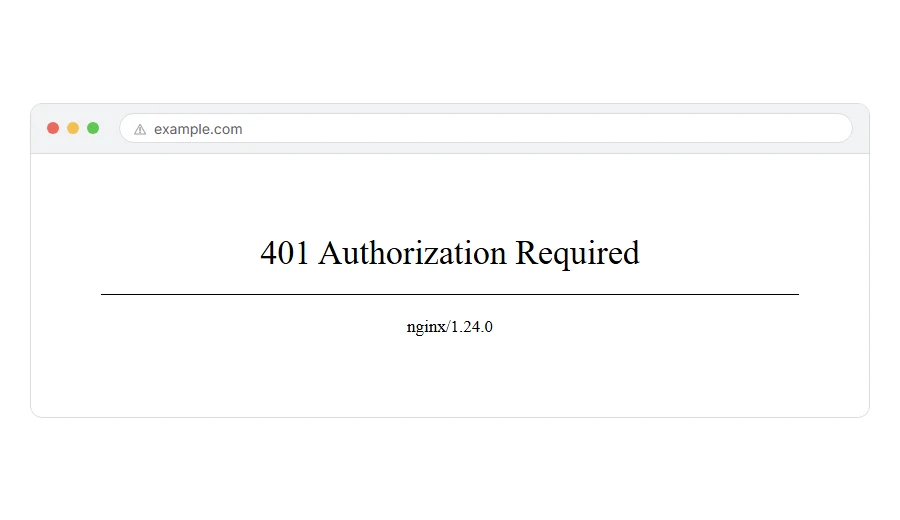
401 and 403 are not the same, and the difference matters
People use them interchangeably and they should not, because they send you in different directions.
401 means “who are you?” The server has not identified you, or the credentials you gave were wrong. Showing the right card fixes it.
403 means “I know who you are, and no.” You are identified and still not allowed. A better card does not help.
So if you are looking at a 401, credentials are the whole story. If you are looking at a 403, they are not.
Where it actually breaks
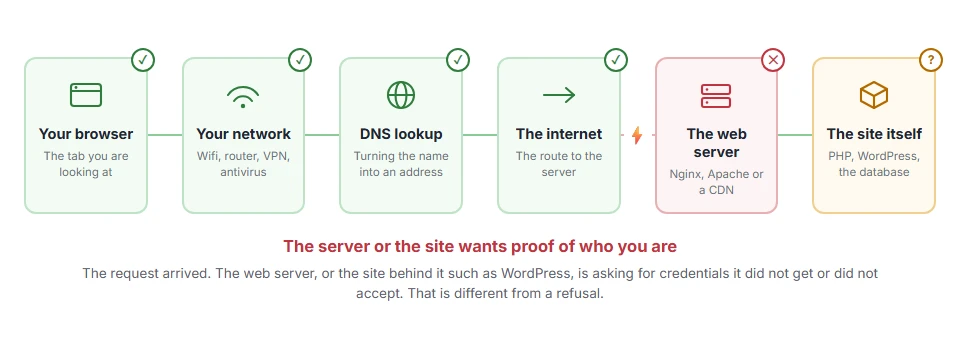
Every page you open makes the same journey. Knowing which step this error stops at tells you which half of the list below is worth your time, because the green steps are already proven to be working.
If you are a visitor
Step 1: Check the obvious credential problems
If a login box appeared, the username or password is being rejected.
Type it by hand rather than letting the browser fill it, because a saved password from an old change is one of the most common causes. Check caps lock. Check you are on the right site, not a similar one.
When this will not help: if no login box appears at all, the site expects a credential your browser does not have, such as an API key. Ordinary visitors will not get past that.
Step 2: Clear the site’s cookies
Browsers remember credentials for a session, and a stale one gets sent and rejected repeatedly.
Open the site in a private window. If it prompts you properly there, clear the cookies for that site in your normal browser and start again.
When this will not help: if the private window gives the same 401 with no prompt, the request needs something a browser cannot supply.
Step 3: Turn off extensions and VPN
Some extensions strip or alter authorization headers, which is enough to turn a working login into a 401.
Test in a private window with extensions disabled, and with the VPN off.
When this will not help: if it fails in every browser on every network, the problem is at the server end and step 4 is your route.
Step 4: If you should have access, ask
There is a point where trying harder is the wrong move.
If it is a work system, a client’s site or a service you pay for, contact whoever runs it. Tell them the exact address and that you are getting a 401 rather than a login page. That distinction helps them find it.
If it is your own site
The .htpasswd prompt you forgot about
This is the most common cause on a site that used to work.
A basic authentication prompt set up during development, on a staging folder or on wp-admin, will keep asking forever. If a browser box pops up before the page loads, that is what you are looking at.
Look for .htpasswd and for AuthType Basic lines in your .htaccess. Remove them if they should no longer be there. If they should stay, make sure you know the username and password, because there is no reset link for this kind of login.
Your REST API is refusing an authenticated request
If your own tools or a plugin get a 401 when calling /wp-json/, the credentials are being lost.
The usual cause is the server stripping the Authorization header before PHP sees it. That is a known Apache behaviour, and the fix is a line in .htaccess:
SetEnvIf Authorization "(.*)" HTTP_AUTHORIZATION=$1Add that and try again.
An application password that was revoked
If you use application passwords for a script or an integration, they can be deleted from the user profile at any time, and any code still using one gets a 401 from then on.
Check Users > Profile > Application Passwords and see whether the one your script uses is still listed.
A security plugin blocking the API
Several security plugins can disable the REST API or restrict it to logged in users, and a script that used to work will start getting 401s the day that setting is switched on.
Check your security plugin’s REST API settings before assuming your credentials are wrong.
When this will not help: none of these apply if the 401 comes from a service you do not run, such as a third party API. Then it is their key, their expiry or their permissions, and their documentation is where the answer is.
For developers calling an API
Three things account for most 401s when the credentials look correct.
The token expired. Many tokens last an hour. If it worked this morning and not now, that is the first thing to check.
The header format is wrong. Authorization: Bearer <token> is not the same as Authorization: <token>, and the difference is silent.
The key is right but lacks the scope. Some services return 401 rather than 403 for a key without permission for that endpoint, which is unhelpful but common.
Read the body of the response rather than just the status. Most APIs explain which of the three it was, and almost nobody looks.
Frequently asked questions
Why does the login box keep reappearing? Because the credentials are being rejected each time. A browser basic auth prompt reappears rather than saying no. If you do not know the password, only whoever set it can reset it.
Is 401 a hack attempt? No. It is a normal part of how the web handles authentication. If you are seeing many 401s in your logs from different addresses, that is somebody probing, but the code itself is ordinary.
Can I bypass a 401? Not from outside, and you should not try. If you should have access, ask the owner. If you should not, the 401 is doing its job.
My API worked yesterday and gives 401 today. What changed? An expired token, a rotated key, or a revoked application password. Those three cover nearly all of them.
If you have any issues, you can ask me via comment, and I will love to help you out.
When a work sign-in is blocked by a rule
A 401 is the server saying you are not authenticated. On a Microsoft work account you can be fully authenticated and still refused, by a policy rather than a password, which shows as error code 53003. That page explains what you can try and what only an administrator can change.
