
Do you want to start making videos for YouTube, and everything you read says you need a proper camera, a microphone and expensive software before you even begin?
You do not. A phone that records in 1080p is enough to start, and the free tools for everything after that are already on your computer or phone. A YouTube video is like a phone call with pictures: if people cannot hear you clearly, good pictures will not save it, and if they can, a plain picture is forgiven.
Here are the seven steps, in the order you will need them:
- Decide whether it is a Short or a regular video
- Make your channel
- Record with the phone you have
- Get the sound right
- Light your face from the front
- Edit it with a free editor
- Upload it properly
In this article you will learn how to make YouTube videos through each of those steps, the music rule that gets new channels into trouble, and what it really takes to earn money from them.
So let’s get started.
1) Decide: a Short or a regular video
YouTube treats the two differently, so decide before you press record.
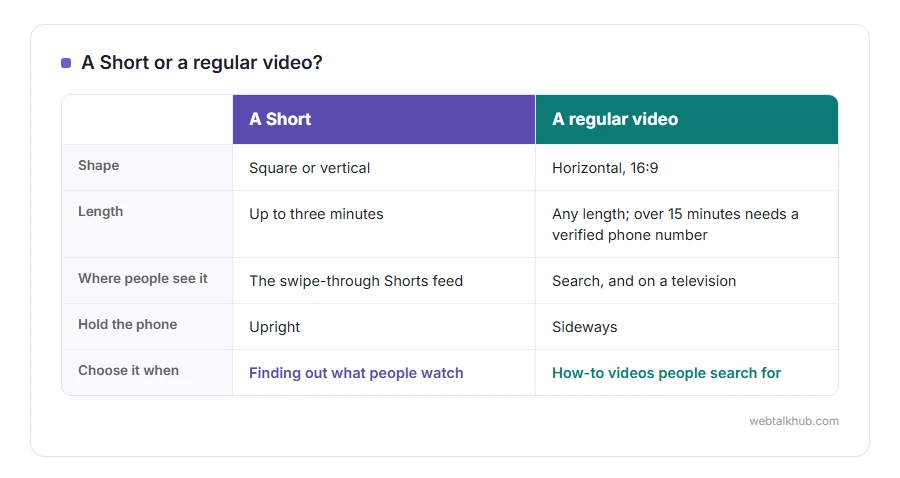
A Short is a square or vertical video of up to three minutes, shown in the swipe-through Shorts feed. A regular video is horizontal, 16:9, any length, and it is what people find through search and watch on a television. Since 15 October 2024, anything square or vertical and up to three minutes long counts as a Short.
If you are not sure yet what your channel is about, I recommend starting with a few Shorts. They are quick to make, and they show you what people actually watch. For how-to videos that people search for, regular videos are the better fit.
2) Make your channel
Sign in to YouTube with your Google account, click your profile picture at the top right, and choose Create a channel. Pick the name people will see; it can be yours or your channel’s.
Then open YouTube Studio and verify your phone number. Without it, YouTube will not let you upload videos longer than 15 minutes or use your own thumbnails. Our guide on how to upload a video to YouTube goes through those first settings.
3) Record with the phone you already have
Use the camera on the back of the phone, which on almost every phone is better than the front one. For a regular video hold the phone sideways, and for a Short hold it upright.
In the camera settings, 1080p at 30 frames a second is plenty. 4K looks sharper, but a minute of it takes hundreds of megabytes, and it does not work well for long recordings, which can make a phone hot enough to stop. Wipe the lens with a soft cloth, because a thumbprint makes everything look hazy, and rest the phone on something steady or a cheap tripod rather than holding it.
4) Get the sound right before the picture
This is where most first videos go wrong, and it costs almost nothing to fix.
Record in the quietest room you have, preferably one with soft things in it: a sofa, curtains, a carpet. A bare room with hard walls echoes, and echo makes a voice tiring to listen to. Keep the microphone close to your mouth. The phone at arm’s length is fine, and wired earphones with a microphone, or a small clip-on microphone, are better still.
Before you record the whole video, record ten seconds and listen back with earphones. The hum of a fridge or a fan that you stopped hearing hours ago is very clear on a recording, and switching it off takes a second.
5) Light your face from the front
Sit facing a window in daylight, so the light falls on your face. With the window behind you, the phone exposes for the bright sky and turns you into a dark shape.
In the evening, put a lamp in front of you and a little to one side. The drawback of daylight is that it changes as you record, so a long video recorded over an afternoon can drift from bright to dim. Record in one sitting when you can.
6) Edit it with a free editor
Cut the pauses, the false starts and the mistakes. Each of these is free:
- Windows 11: Clipchamp, which comes with Windows and exports 1080p without a watermark
- Mac, iPhone and iPad: iMovie
- A phone: YouTube Create, YouTube’s own editing app, on Android and iPhone
- A strong computer: DaVinci Resolve
Be careful with music. Only use music you have the rights to, because a popular song can get your video blocked in some countries or its earnings sent to the song’s owner. YouTube’s Audio Library has free tracks that are allowed even in monetised videos. Our guide on how to edit YouTube videos covers the editors and YouTube’s own editor for videos already uploaded.
7) Upload it properly
The title matters most. Use the words somebody would type into the search box to find it, not a clever phrase. The first two lines of the description are what show before “more”, so say what the video is about there.
For the thumbnail, use a picture of 1280 by 720 pixels, with a face or the result and a few large words at most. Answer the made for kids question honestly, and choose who can see it: public, unlisted or private. The upload guide linked in step 2 walks through each of these screens.
Can you make money from it?
Yes, eventually, and it takes longer than most people expect. To join the YouTube Partner Program and earn from ads, a channel needs 1,000 subscribers plus either 4,000 hours of public watch time in the last 12 months, or 10 million Shorts views in the last 90 days.
YouTube has also announced that the program’s terms change on 1 February 2027, so check the current numbers in YouTube Studio’s Earn section rather than trusting any old guide, this one included, and keep in mind that most channels take many months to get there.
FAQ(Making YouTube Videos)
Do I need an expensive camera?
No. Any phone that records 1080p video is enough to start. If you spend anything, spend it on a small microphone first and a tripod second.
Do I have to show my face?
No. Many channels are screen recordings with a voice over. Windows 11’s Snipping Tool can record the screen, and on a Mac, pressing Shift + Command + 5 does the same.
How long should a YouTube video be?
As long as it needs to be and no longer. A how-to that answers the question in four minutes does better than one stretched to ten.
Can I use any song if I credit the artist?
No. A credit does not give you permission. Use the Audio Library, or music you have a licence for.
If you have any issues, you can ask me via comment, and I will love to help you out.
