
Do you need an email address for a job application, a new phone, or a fresh start away from an inbox that is full of spam, and you are not sure which provider to pick or what they will ask you for?
Don’t worry, this takes about five minutes and costs nothing. Every big provider gives addresses away free and makes its money elsewhere, so the real choices are which one suits you and what name to put before the @.
Here is what you will be asked for, whichever you choose:
- The address you want, which may already be taken
- A password
- Your name and date of birth, except at Proton Mail
- Often a mobile number, depending on the provider
In this article you will learn how to create an email address with Gmail, Outlook, Yahoo, Proton Mail and iCloud, what each one needs from you, and which one I would pick for which kind of person.
So let’s get started.
1) Decide the address before you pick the provider
The name is the part you cannot easily change later, so it deserves a minute of thought.
For anything a recruiter or a client will see, use your name: firstname.lastname, or with a middle initial if that is taken. If you need to add something, use a word that means something to you rather than your birth year, because a year tells every stranger your age.
I recommend keeping two addresses: one with your name for people, and a second for shop sign ups and newsletters, which is where most spam starts. Our guide on how to stop spam and junk emails explains why that split works.
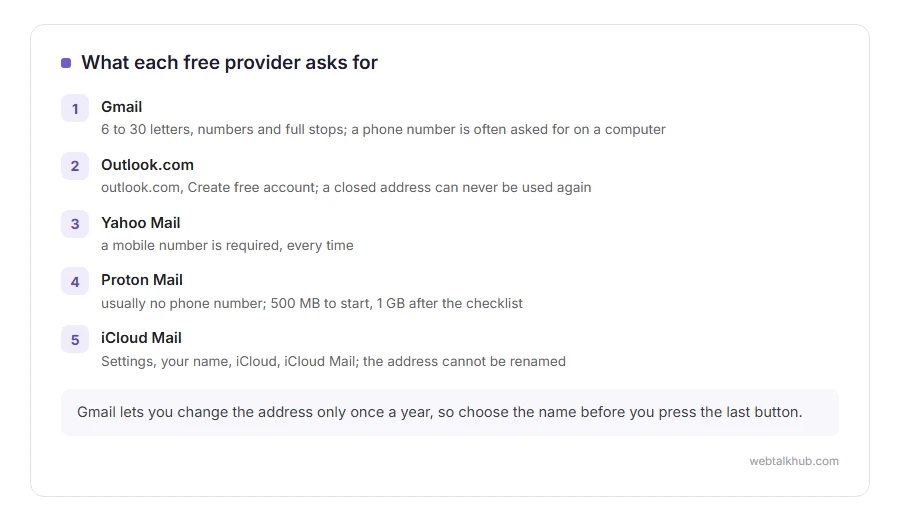
Be careful before you press the final button, because this is the one thing that is hard to fix afterwards. Gmail lets you change your address only once a year, and not every account has that option yet. An iCloud address cannot be renamed, and Microsoft never lets anybody use a closed address again.
2) Gmail
Go to accounts.google.com/signup, or open gmail.com and choose Create account, then For my personal use. Enter your name and date of birth, then pick an address from the suggestions or type your own.
Google’s rules for the part before @gmail.com are 6 to 30 characters, using only letters, numbers and full stops. Full stops do not change anything in Gmail: firstname.lastname and firstnamelastname reach the same inbox. Then choose a password, and add a recovery email or phone so you can get back in if you forget it.
The phone number is where Gmail varies. Google treats it as optional, but in practice the sign up often will not finish on a computer without one, and on a phone it asks less often. What you get is 15 GB of free storage, shared between Gmail, Google Drive and Google Photos.
3) Outlook.com
Go to outlook.com and select Create free account. Type the name you want before @outlook.com, choose a password, then give your country, date of birth and name, and complete the short puzzle Microsoft shows to prove you are a person.
The same account signs you in to Windows, Office on the web, OneDrive and Xbox, which is the main reason to choose it.
The only drawback worth knowing is permanence. If you ever close the account, that address is gone for good, and even you cannot create it again later.
4) Yahoo Mail
Open the Yahoo sign up page and fill in your name, the address you want, a password and your date of birth. Yahoo then sends a code to your mobile to verify it.
This will not work without a mobile number. Yahoo’s own help lists it as a required field, next to the password and date of birth. There is one exception: if you only want a Yahoo account and not a Yahoo address, choose My Email during sign up and use an address you already have.
5) Proton Mail, for privacy or when you have no phone number to give
Proton Mail is run from Switzerland and is built around privacy: messages between two Proton addresses are end to end encrypted, and it does not read your mail for advertising.
Go to proton.me/mail, choose the free plan, then pick your username and password. It usually asks you to prove you are a person with a puzzle or a code sent to another email address, and only sometimes by text message, which makes it the easiest of the five without a phone number.
The limit is storage. The free plan starts at 500 MB for mail, and completing Proton’s getting started checklist raises it to 1 GB, against Gmail’s 15 GB. That is plenty for letters and far too little if people send you photos.
6) iCloud Mail, if you use an iPhone or a Mac
If you have an Apple Account, you already have the right to an @icloud.com address. On an iPhone or iPad, open Settings, tap your name, then iCloud, then iCloud Mail (or Mail), and follow the steps to create it.
Choose carefully, because Apple does not let you rename that primary address later, although you can add aliases. The free iCloud storage is 5 GB and is shared with your photo and phone backups, so it fills up faster than you would expect.
Which one should you choose?
There is no single right answer, so here is the one I would give by kind of person:
- You use an Android phone or Google’s apps: Gmail, because it is already on your phone and its 15 GB goes a long way.
- You live in Windows and Office: Outlook.com, because the same account opens everything else.
- Everything you own is Apple: iCloud Mail, because it is already set up on each device.
- Privacy matters most, or you have no phone number to give: Proton Mail.
- It is for a business: none of these. An address at your own domain looks more trustworthy, and our guide to getting a business email address shows how.
Whichever you pick, give it a password you use nowhere else. Our password generator makes one in your browser.
FAQ(Creating an Email Address)
Can I create an email address without a phone number?
Usually, with Proton Mail. Gmail sometimes lets you skip the number, more often on a phone than on a computer. Yahoo requires one every time.
Is it really free?
Yes, all five. The paid plans add storage, remove limits or let you use your own domain, and none of them is needed for everyday email.
Can I have more than one email address?
Yes, as many as you like, each with its own account and password. A separate one for sign ups is a good habit. A separate address is also the first step if you need to send an email anonymously.
How old do you have to be?
Every provider except Proton Mail asks for your date of birth. Below the minimum age in your country, which is 13 in the US, a parent has to set the account up, for Gmail through Google’s Family Link.
When it is ready, our guides on how to send an email and how to write a professional email cover the next steps.
If you have any issues, you can ask me via comment, and I will love to help you out.
