
Do you need to send an email anonymously, to report a problem at work, warn somebody, or ask a question you would rather not have linked to you, and you are not sure how anonymous any of it really is?
People do this for good reasons every day, and it can be done properly. It is like posting a letter with no return address: the person who opens it cannot see who sent it, but the post office still knows which postbox it came from, and that part is what most guides skip.
How anonymous you are depends on three things:
- The account: an address with nothing of yours on it
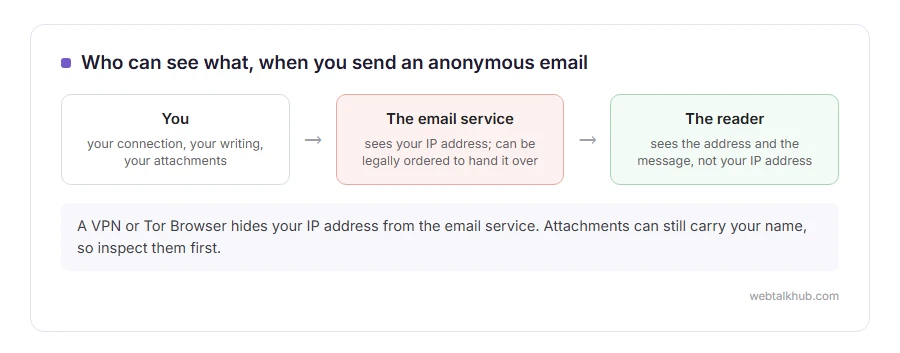
- The connection: your IP address, which the email service can record even though the reader never sees it
- The message itself: your writing, your signature and the details hidden inside attachments
In this article you will learn how to handle each of those, which kind of service suits which situation, and where anonymity honestly stops, because nothing here makes you anonymous to a court.
So let’s get started.
1) Make a separate address with nothing of yours on it
Never send it from your own address with a different display name. Changing the name hides your name and leaves your address, which is usually the giveaway.
Create a new account instead, and give it nothing that points back at you: no real name, no birthday, no recovery email or phone number of yours. Proton Mail is the easiest for this, because it usually lets you sign up without a phone number, and it does not show your IP address to the people you write to.
Gmail and Outlook.com work too, but they often insist on a phone number at sign up, and a number is tied to your name through your mobile contract. This will not help much if the account and your real life are linked by that one number.
2) Hide your connection from the email service
The person reading your email cannot see where you were. Gmail has never put the sender’s IP address into messages sent from its website or apps, and Outlook.com stopped showing it in plain form in 2012.
The email service itself is different. It sees the address of every connection you make, and it can be ordered to hand that over. Proton Mail normally does not log IP addresses, yet in 2021 it was legally compelled to log the IP address of a French climate activist under an order from Swiss authorities. Its privacy policy now says it can be made to do so if you break Swiss law.
To keep your address from the service, connect through something else:
- A VPN hides your address from the email service, but the VPN company sees it instead, so you are moving your trust rather than removing it.
- Tor Browser sends your connection through three volunteer relays, so no single one knows both who you are and where you went. Proton Mail works in it. It is slower, and some services ask more questions of Tor users at sign up.
Keep in mind that a work or school network is the worst place to do any of this: whoever runs the network can see which service you connected to and when, even when they cannot read the email.
3) Take the clues out of the message itself
This is where most people give themselves away, and no service can do it for you.
Your writing is recognisable to people who know you: favourite phrases, the way you sign off, typos you always make. Write plainer than you normally would, and leave out details only you would know.
Attachments carry hidden details. A Word document usually holds the author’s name. Before attaching one, open File, Info, Check for Issues, Inspect Document, then remove the personal information it finds. Microsoft recommends doing this on a copy, because what it removes cannot always be restored.
Photos can hold the exact place they were taken. On an iPhone, share the photo with the Share button, tap Options and turn off Location. Or skip the attachment entirely: pasting the text into the email itself carries no hidden details at all.
4) Throwaway inbox sites are for receiving, not sending
Sites that hand you a temporary address with no sign up are made for catching a confirmation code, not for writing to people. Most can only receive, and they delete what arrives quickly: Guerrilla Mail, one of the oldest, deletes delivered mail after an hour.
The few that can send are used by spammers too, so their messages are often filtered away before anybody reads them. For a message you want to arrive, a new account from section 1 is the better route.
5) Anonymous sending websites
There are also sites that send a message for you from their own address, with no account at all. They know your IP address unless you hide it, free ones often add their own links to your message, and their mail frequently lands in spam.
I don’t recommend them for anything that matters. They are fine for a harmless prank between friends and poor for anything you need somebody to take seriously.
Where anonymity stops
Everything above protects you from the person reading your email. It does not protect you from a legal order to the service you used, to your VPN, or to your internet provider, and providers such as Google and Microsoft publish how often they answer those.
That matters most for threats and harassment, which are crimes whatever address they come from, and which the police are practised at tracing. If what you want to send could get somebody hurt, an anonymous address will not keep you out of it.
For reporting wrongdoing, look first for a proper channel. Many employers run an anonymous reporting line, and many news organisations accept tips through SecureDrop, a system built for exactly this kind of message.
FAQ(Sending an Email Anonymously)
Can the person I email find out who I am?
From the email alone, usually not, if you followed sections 1 to 3. The service you used can, and so can anyone who gets a court order to it.
Is it illegal to send an anonymous email?
Sending an email without your name is not a crime in itself. What the email says can be, and a threat or harassment is treated the same whether it is signed or not.
Will my anonymous email go to spam?
It might. A brand new account has no history, so its first messages are more likely to be filtered. A short, plain message with no links and no attachments gets through more often. The basics in how to send an email help any message arrive.
Can they reply to me?
Yes, to the address you sent from. Decide before you send whether you will check it, and sign in to it the same careful way every time.
If you have any issues, you can ask me via comment, and I will love to help you out.
