
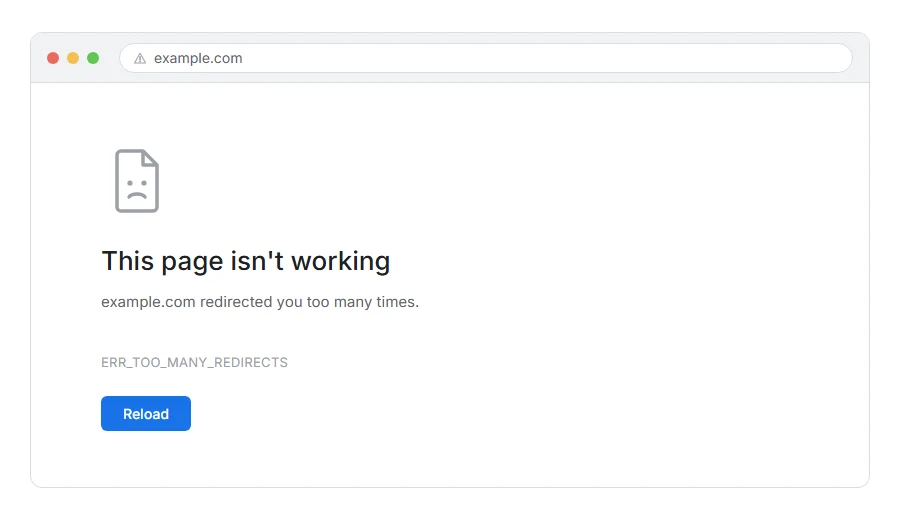
The page will not load and your browser says ERR_TOO_MANY_REDIRECTS, or on some browsers “the page isn’t redirecting properly”.
In one line: two things are pointing at each other, and your browser has given up going round in circles.
Think of it like being told to go and see Ali. Ali sends you to Bilal. Bilal sends you straight back to Ali. After twenty laps you stop walking. That is exactly what your browser does, and this error is it giving up.
Do not worry, you are not alone. Almost every case comes down to one of four settings disagreeing about the correct address of the site, and I am here to help you find which pair is arguing.
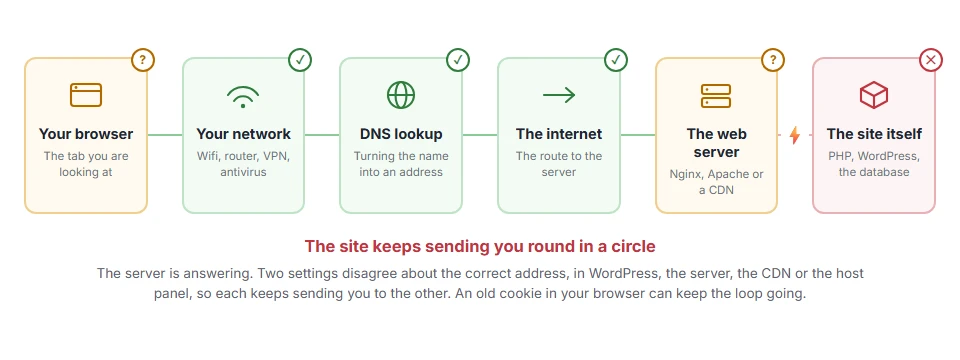
Where it actually breaks
Every page you open makes the same journey. Knowing which step this error stops at tells you which half of the list below is worth your time, because the green steps are already proven to be working.
First, the thirty second check
Before changing anything, open the site in a private window.
If it loads there, the loop is tied to your normal browser, usually an old cookie, and clearing the cookies for that one site fixes it. In Chrome, click the icon to the left of the address, choose site settings, and delete the data for that site.
That alone solves a good share of these, and it saves touching your site’s settings for no reason.
When this will not help: if the private window shows the same error, the loop is real and on the server. Carry on. And if it only loops when you are logged in, clearing cookies just logs you out and the loop comes back at your next login. A private window is logged out, so it hides this one. Go to step 4.
Step 1: Check your two WordPress addresses
This is the most common real cause and it takes a minute.
Go to Settings > General. Look at WordPress Address (URL) and Site Address (URL).
The two must agree with each other and with how you actually reach the site. Same protocol, either both https:// or both http://. Same host, either both with www. or both without.
If one says https://www.yoursite.com and the other says https://yoursite.com, WordPress will bounce visitors between the two forever. That is your loop.
When this will not help: if you are locked out of the dashboard, you cannot reach that screen. Set both in wp-config.php instead by adding define('WP_HOME','https://yoursite.com'); and define('WP_SITEURL','https://yoursite.com'); with your real address.
Step 2: Look for a duplicate redirect rule
If you have an SSL plugin forcing https, and your .htaccess also forces https, and your host has a redirect switched on as well, they can end up fighting.
Pick one and turn the other two off. It genuinely does not matter which one you keep.
Rename .htaccess to .htaccess-off to test whether it is the one at fault. If the loop stops, that file was involved. Rebuild a clean one afterwards by going to Settings > Permalinks and clicking Save.
When this will not help: renaming .htaccess breaks your permalinks until you save that Permalinks page. Do it straight away, not later.
Step 3: Check Cloudflare’s SSL mode
If you use Cloudflare, this is the classic trap and it catches people for hours.
If your SSL mode is set to Flexible, Cloudflare talks to your server over plain http. Your server sees an http request, and helpfully redirects it to https. Cloudflare then serves that, and the whole thing starts again. A perfect loop, built out of two things both trying to be helpful.
Set the mode to Full or Full (strict) instead. In Cloudflare go to SSL/TLS and change the encryption mode.
When this will not help: Full (strict) needs a valid certificate on your own server. If yours is self-signed or expired, use Full rather than Full (strict). If you have no certificate at all, add one first, because Full still needs one on your server. Most hosts give one free.
Step 4: Deactivate your plugins
A redirect plugin, a membership plugin or a multilingual plugin can each create a loop, usually after a settings change.
Deactivate everything and test. If the loop clears, switch them back on one at a time until it returns. If you cannot reach the dashboard, rename wp-content/plugins to plugins-off over FTP.
When this will not help: if the loop happens with every plugin off, it is in your settings or your server config, not your plugins.
Step 5: Check for a redirect on the host side
Some control panels have their own “force https” or “redirect www” switch, sitting completely outside WordPress.
Look in your host’s domain settings. If one is on there and another is on in WordPress, you have your pair.
When this will not help: not every host offers this, and on many it is buried. If you cannot find it, ask support directly whether any redirect is set at account level.
Step 6: Look at the redirect chain itself
If you are still stuck, stop guessing and look at what is actually happening.
Search for an online redirect checker, put your address in, and it will show you every hop. You will see the loop written out plainly, usually as the same two addresses alternating.
That tells you exactly which two settings are arguing, and then the fix is obvious rather than a hunt.
When this will not help: a redirect checker only sees what a fresh visitor sees. If the loop only happens when you are logged in, it is a plugin or a role rule and you need step 4.
Why browsers stop at all
It is worth a sentence, because it explains why the error looks so abrupt.
There is no way for a browser to tell the difference between a legitimate chain of redirects and a loop that will never end. So it counts. After about twenty hops, most browsers stop and show you this.
That limit is why you sometimes see the page flash several times before the error appears. It really was trying.
Frequently asked questions
Why does it work on my phone but not my laptop? Because your phone does not have the cookie your laptop does. That is a strong sign the thirty second check at the top is your fix.
Is ERR_TOO_MANY_REDIRECTS a virus? No. It is a configuration disagreement. Two settings both being confident and both being wrong.
I fixed the setting and it still loops. Why? Old cookies. Clear the cookies for that site, or test in a private window, before deciding the fix did not work.
Can this hurt my search rankings? If it lasts, yes, because search engines cannot reach the page either. A brief loop that you fix the same day is not something to lose sleep over.
If you have any issues, you can ask me via comment, and I will love to help you out.
Related things that break after a redirect change
Error names are easy to mix up, and the wrong page wastes your time. If what you are looking at is not quite what this one describes, one of these will be closer.
- 404 Not Found, the redirect worked and landed on nothing.
- ERR_CACHE_MISS, the back button complains instead, which is usually not an error at all.
