
Is there a PDF that asks for a password every time you open it, a bank statement, a payslip or a contract, and you would like to remove a password from a PDF so it opens like any other file?
If you know the password, this takes a minute and costs nothing. You open the file once with the password, then save a new copy without it. Every method below works that way, and none of them needs Adobe Acrobat.
First, it helps to know which kind of password you are dealing with, because PDFs have two:
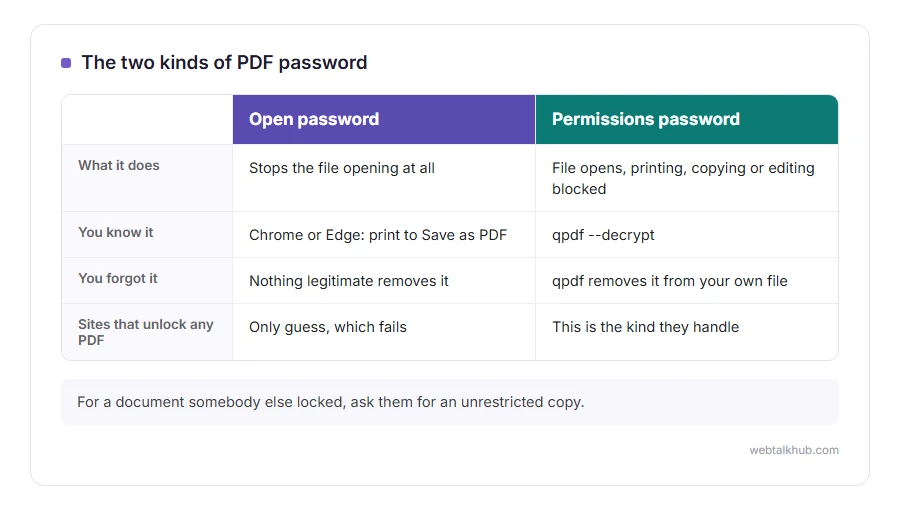
- An open password, which stops the file opening at all
- A permissions password, which lets the file open but blocks printing, copying or editing
In this guide I will show you four ways to save an unlocked copy, which kind each one handles, and what cannot be done when you do not know the password.
Before you start, keep a copy of the original locked file. Some banks and employers expect you to keep it, and an unlocked copy is only as safe as the folder you put it in.
So let’s get started.
1) Google Chrome or Microsoft Edge
This is the quickest way on any computer, and I recommend it if you only have one or two files.
Drag the PDF into a Chrome or Edge window, and type the password when it asks. Then press Ctrl and P, or Command and P on a Mac, set the destination to Save as PDF, and click Save. The new file opens with no password.
This will not work if the file’s own settings forbid printing, because printing is exactly the route that setting blocks. In that case the print option may be greyed out, and one of the methods below is the answer.
2) Preview on a Mac
Open the PDF in Preview and enter the password. Then choose File, then Export, keep PDF as the format, click Permissions, untick Require Password To Open Document, and save the copy under a new name.
Preview keeps the text selectable and the links working, so the copy behaves exactly like the original apart from the password.
3) Adobe Acrobat Pro
If you already pay for Acrobat Pro, open the file, go to Menu (File on a Mac), then Document Properties, then the Security tab, and set Security Method to No Security. Save, and the password is gone from that file.
The free Acrobat Reader cannot do this. It will open a protected file with the password, and it will not save one without it.
4) qpdf, for many files at once
qpdf is a free command line program for Windows, Mac and Linux, and it is the one to use when you have a folder full of statements.
The command is qpdf –password=YOURPASSWORD –decrypt locked.pdf unlocked.pdf, with your own password and file names. It writes a new file without any protection and leaves the original untouched.
Keep in mind that the password sits in your command history afterwards. On a shared computer, clear the history when you are done.
If the file opens but will not print or copy
That is a permissions password. The file opens because the open password is empty, and the restrictions are only a flag asking programs to behave.
If it is your own document and you have forgotten the permissions password, the qpdf command above removes the restrictions as well, without needing that password. For a document somebody else made, ask them for an unrestricted copy, since they locked it on purpose.
If you do not know the open password
Nothing legitimate removes it. A modern PDF open password encrypts the whole file, and without the password the contents are simply unreadable.
Sites that promise to unlock any PDF either only handle the permissions kind, or try to guess, which fails against any reasonable password. Ask whoever sent the file, and look at the letter or email it came with, since banks often explain their password format there.
What to do with the unlocked copy
If it is too big to email, our PDF compressor shrinks it in your browser without uploading it. If you need several statements in one file, the PDF merger joins them, and our guide on how to edit a PDF covers changing what is inside.
FAQ(Remove a Password From a PDF)
Can I remove a PDF password without knowing it?
Not the open password. A permissions password, the kind that only blocks printing or copying, can be removed from your own documents without it.
Is it legal to remove the password from a PDF?
From your own documents, such as your statements and payslips, yes. Removing protection from somebody else’s document without permission is a different matter.
Why does my bank lock its PDFs?
Because statements travel by email, which is not private. The password keeps the file unreadable if the email goes to the wrong place.
Does removing the password change the PDF?
No. The pages, text and layout stay exactly the same, and only the protection is gone.
Can I remove the password on my phone?
On an iPhone, open the PDF in Files, enter the password, then use Share and Print, and pinch out on the preview to save a copy. On Android, Chrome’s print to PDF works the same way as on a computer.
If you have any issues, you can ask me via comment, and I will love to help you out.
Once it is unlocked
An unlocked copy can be cut up like any other PDF, which is often why people unlock it in the first place.
- Split the PDF into single pages, every few pages, or only the pages you need, in your browser with nothing uploaded.
