
Is Firefox refusing to open a site for you, with “Secure Connection Failed” and SSL_ERROR_RX_RECORD_TOO_LONG in the details, while the same site may or may not open in another browser?
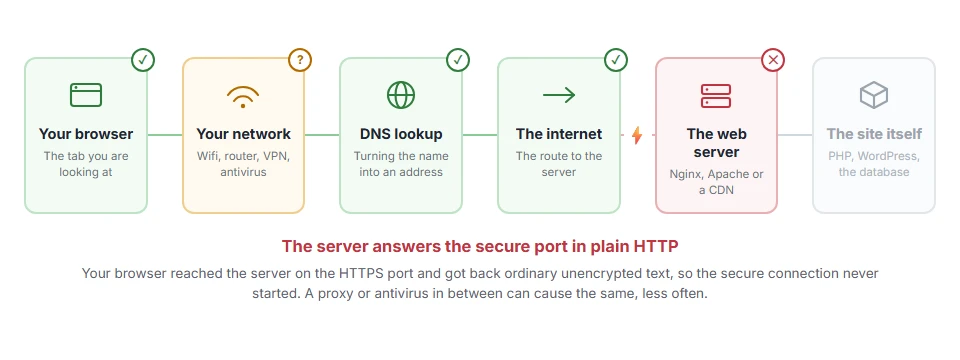
No need to worry about your own computer, because this one is almost always the website’s setup. Firefox asked for a secure HTTPS connection and got back something that was not encrypted at all, most often a plain HTTP answer on the port meant for HTTPS. Firefox read that plain text as if it were an encrypted record, found it far longer than any valid record could be, and stopped.
Chrome and Edge show the same fault as ERR_SSL_PROTOCOL_ERROR, which is why people sometimes think only Firefox is affected.
The usual causes are:
- The web server listens on port 443 without HTTPS switched on for it
- Nginx is missing the word ssl on its listen line
- Apache has no secure virtual host for the site, or mod_ssl is not loaded
- The address has a wrong port in it, such as https with :80
- A proxy, antivirus or network filter is interfering with secure connections
In this guide I will cover the quick things a visitor can try, then the server fixes, which is where this is nearly always solved.
So let’s get started.
Where it actually breaks
Every page you open makes the same journey. Knowing which step this error stops at tells you which half of the list below is worth your time, because the green steps are already proven to be working.
1) Check the address
If the address has a port number after the domain, such as https://example.com:80, remove it. Port 80 speaks plain HTTP, so asking it for HTTPS produces exactly this error.
Try the site on another network, such as mobile data, as well. If it opens there, a proxy or filter on your first network is the cause.
2) Turn off the proxy or HTTPS scanning
In Firefox, open Settings, search for proxy, click Configure proxy, and set it to No proxy or Use system proxy settings. Some antivirus programs inspect secure connections, and turning that option off for a moment is a quick test.
This will not help when the site itself is misconfigured, which is the common case. Then only the owner can fix it, so tell them.
If the site is yours: Nginx
The listen line for port 443 must include ssl:
listen 443 ssl;A line that says listen 443; without ssl makes Nginx answer in plain HTTP on the secure port, which is the classic cause of this exact error. Add ssl, check the certificate lines are there, then test the config with nginx -t and reload.
If the site is yours: Apache
Apache needs the SSL module loaded and a virtual host for port 443 with SSLEngine on and the certificate paths set. On Debian and Ubuntu, a2enmod ssl turns the module on and a2ensite default-ssl enables the standard secure site, and apachectl configtest checks it before a restart.
Before you change anything, keep a copy of the current config files. A typo in a virtual host can take the whole site down until it is fixed.
If the site is yours: hosting and Cloudflare
On shared hosting, this usually means no certificate is installed for the domain yet. Switch on the free certificate in the SSL or AutoSSL section of the control panel.
Behind Cloudflare, check the SSL mode. Full or Full (strict) with a server that has no HTTPS gives Cloudflare errors rather than this one, and our pages on error 525 and error 526 cover those.
How to confirm it is fixed
From a command line, curl -v https://yoursite.com should show a TLS handshake followed by the page. If it shows an error about the wrong version number, the server is still speaking plain HTTP on 443.
I recommend a free SSL checker as the final test, since it checks the certificate and the certificate chain at the same time.
FAQ(SSL_ERROR_RX_RECORD_TOO_LONG)
What does SSL_ERROR_RX_RECORD_TOO_LONG mean?
Firefox asked for an encrypted connection and received plain, unencrypted data, which it could not read as a secure record.
Is it my computer or the website?
Almost always the website’s server settings. A proxy or antivirus on your side is the less common cause.
Why does the site work in Chrome?
Usually it does not. Chrome shows the same fault as ERR_SSL_PROTOCOL_ERROR. If Chrome really works, compare the exact addresses, including any port.
How do I fix it in Nginx?
Make sure the port 443 listen line reads listen 443 ssl; and the certificate settings are present, then reload Nginx.
Can clearing the cache fix it?
Rarely. The problem is how the server answers, which the browser cache does not change.
If you have any issues, you can ask me via comment, and I will love to help you out.
